Why Free ERP Software Isn’t Always Free
Let’s cut to the chase: free construction ERP software isn’t truly free. You might avoid upfront payments, but the hidden costs can quickly drain your margins. Missed approvals, disorganized RFQs, and late purchase orders don’t just cause headaches—they can seriously impact project deadlines and profitability.
Many small contractors opt for free tools, thinking they’re saving money. But without structured procurement workflows, they often end up wasting more. Let’s break down why free ERP software can’t deliver what your business really needs.
The Real Costs of Free ERP Software
Free ERP tools often come with major limitations that aren’t immediately obvious. Here are some of the hidden costs you should consider:
-
Time Drain from Manual Processes: Free tools typically lack automation. Procurement teams spend hours manually tracking material requisitions, RFQs, and POs. This inefficiency leads to delays, especially when managing multiple projects.
-
Errors from Lack of Accountability: Without multi-level approvals or clear workflows, decision-making becomes chaotic. Mistakes like ordering the wrong materials or missing deadlines can hurt your margins.
-
Vendor Issues: Free tools rarely provide vendor comparison features. Contractors often select vendors based on price alone, without evaluating reliability metrics. Cheap quotes can result in late deliveries or substandard materials.
-
Scalability Limits: Free ERP software is often designed for small-scale operations. As your company grows, these systems won’t support complex workflows, multi-site management, or integration with accounting software.
By the time you factor in these inefficiencies, your "free" ERP solution isn’t saving you money—it’s costing you more.
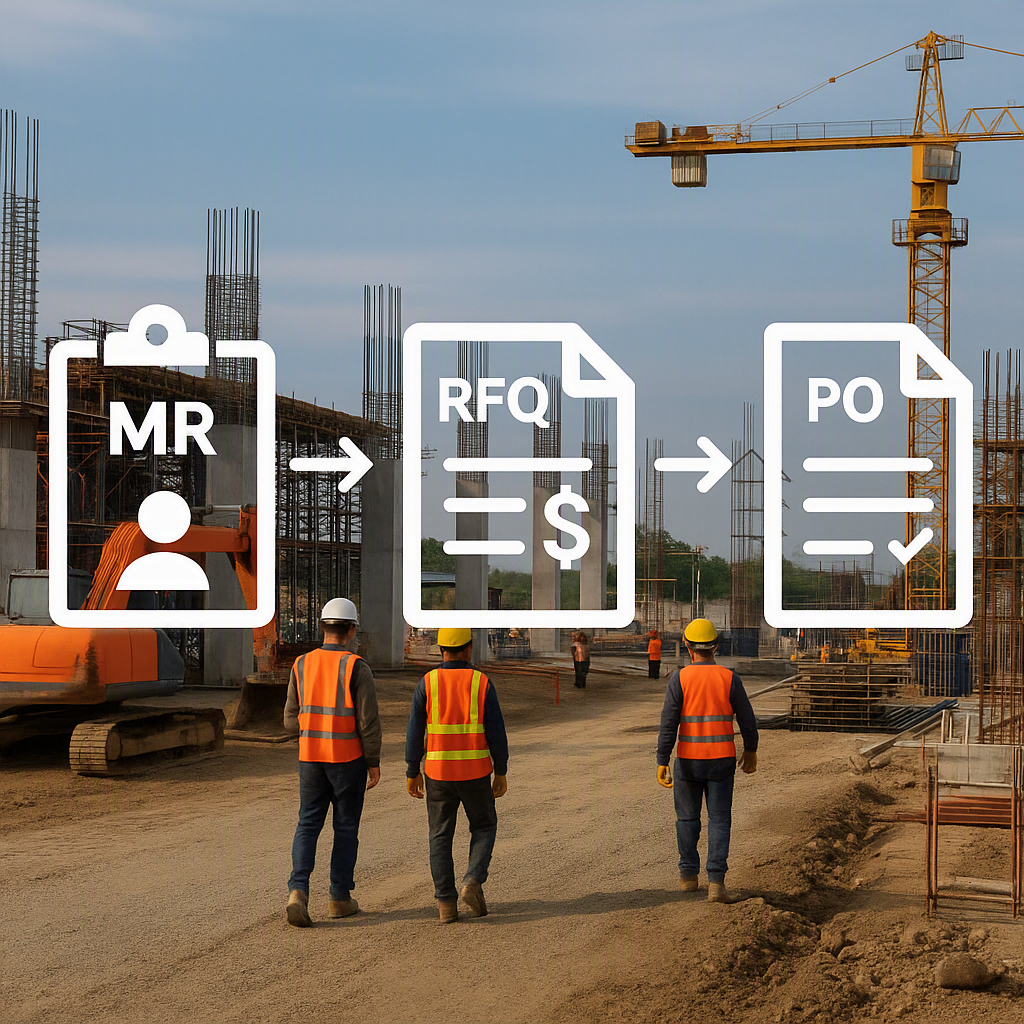
The MR → RFQ → PO Workflow: Fixing Procurement Chaos
A proper construction ERP system structures your procurement process into clear, actionable steps:
1. Material Requisition (MR)
Site teams input requests for materials with precise quantities and specifications. This eliminates ambiguity and ensures procurement teams know exactly what to source.
Actionable Tip: Implement digital forms for MRs that include required fields like material type, quantity, and delivery deadline. If your ERP allows it, set up automatic notifications to procurement teams when an MR is submitted.
2. Request for Quotation (RFQ)
Procurement teams send structured RFQs to multiple vendors, ensuring apples-to-apples comparisons. RFQs should include consistent parameters, such as material specs, delivery timelines, and payment terms.
Actionable Tip: Use ERP-generated RFQ templates to standardize requests. This ensures vendors quote based on identical criteria, making comparison straightforward and fair.
3. Vendor Offer Evaluation
Quotes are evaluated side-by-side, factoring in price, lead time, and vendor reliability. A good ERP system will allow you to track vendor performance metrics—such as on-time delivery rates—over time.
Actionable Tip: Avoid relying solely on price. Create weighted scoring criteria that prioritize reliability and quality alongside cost. For example, assign 40% to price, 30% to lead time, and 30% to past performance.
4. Purchase Order (PO)
Procurement teams issue POs with automated approval chains, locking in rates and tracking deliveries. This ensures accountability at every step.
Actionable Tip: Configure role-based approval workflows in your ERP. For example, site managers can approve POs below a certain threshold, while higher-value POs require senior-level sign-off.
Why Vendor Comparison Is Critical
Many contractors mistakenly believe choosing the lowest quote (L1) is the best way to save money. However, this approach often backfires. If the vendor can’t deliver materials on time or provides substandard products, your project suffers delays and quality issues.
A structured ERP system helps you evaluate vendors holistically. Beyond price, it tracks:
- Delivery Timelines: Late deliveries can delay entire project milestones.
- Material Quality: Substandard materials can lead to rework and increased costs.
- Past Performance: Historical data on vendor reliability ensures informed decision-making.
Comparison Table: Vendor Evaluation Criteria
| Criteria | Free ERP Tools | Paid ERP Systems |
|---|---|---|
| Price Evaluation | Basic | Weighted scoring |
| Lead Time | Manual tracking | Automated alerts |
| Reliability | Limited/no tracking | Historical performance |
| Quality Control | Not included | Integrated checks |
Free ERP vs. Paid ERP: What’s the Difference?
Let’s break down the key differences between free and paid ERP systems:
| Feature | Free ERP Tools | Paid ERP Systems |
|---|---|---|
| Multi-Level Approvals | No | Yes |
| Reporting | Basic dashboards | Advanced analytics |
| Integration | Rarely integrates with accounting | Full integration (e.g., Tally, SAP) |
| Automation | Limited | Workflow automation |
| Scalability | Small-scale projects only | Enterprise-grade scalability |
While free ERP tools might suffice for small operations, they fall short when managing complex projects or scaling across multiple sites. Paid systems justify their cost by automating processes, reducing errors, and improving efficiency.
FAQ: Common Questions About Construction ERP
Q: Can free ERP tools handle GST compliance? A: Most free tools don’t include robust GST modules. Contractors often need to manually integrate with accounting software, which adds complexity and increases the risk of errors. Paid ERP systems usually offer built-in GST compliance features.
Q: What’s the biggest risk of using free ERP software? A: Procurement chaos. Free tools often lack structured workflows for MRs, RFQs, and POs. This leads to missed deadlines, cost overruns, and vendor disputes.
Q: How do paid ERP systems justify their cost? A: Paid systems save money by automating workflows, reducing manual errors, and improving decision-making. For example, structured vendor evaluations prevent costly mistakes like choosing unreliable suppliers.
Q: Can I migrate from a free ERP to a paid one later? A: Yes, but migration can be time-consuming and complex. It’s better to start with a scalable paid ERP system to avoid disruption later.
Q: Are there affordable paid ERP options for small contractors? A: Many ERP providers offer tiered pricing based on company size and project complexity. Look for systems with flexible plans that fit your budget.
Common Mistakes to Avoid
- Skipping RFQs: Some contractors go straight to POs without issuing RFQs, leading to higher costs and unreliable vendors.
- Focusing Only on Price: Choosing the cheapest vendor often results in delays and quality issues. Always evaluate reliability alongside cost.
- Using Spreadsheets for Approvals: Spreadsheets can’t enforce accountability or multi-level approval chains. A structured ERP eliminates approval bottlenecks.
- Neglecting Scalability: Free tools might work for one project but fail when managing multiple sites. Invest in a scalable ERP early to avoid hitting roadblocks as you grow.
Call-to-Action
If procurement chaos is costing your projects, it’s time to switch to structured ERP workflows. Paid ERP systems offer automation, accountability, and vendor comparison tools that protect your margins. Get started with ProjectsNext →
Learn more at JobNext.ai