Comparative Statement of Quotations — Format (Free Excel & PDF)
A ready-to-use comparative statement format for tabulating supplier quotations side-by-side and selecting the lowest (L1) vendor. Built for Indian construction & procurement teams — GST-ready, with live Excel formulas that auto-calculate amounts, highlight the lowest rate per line, and total each vendor. Free download, no sign-up.
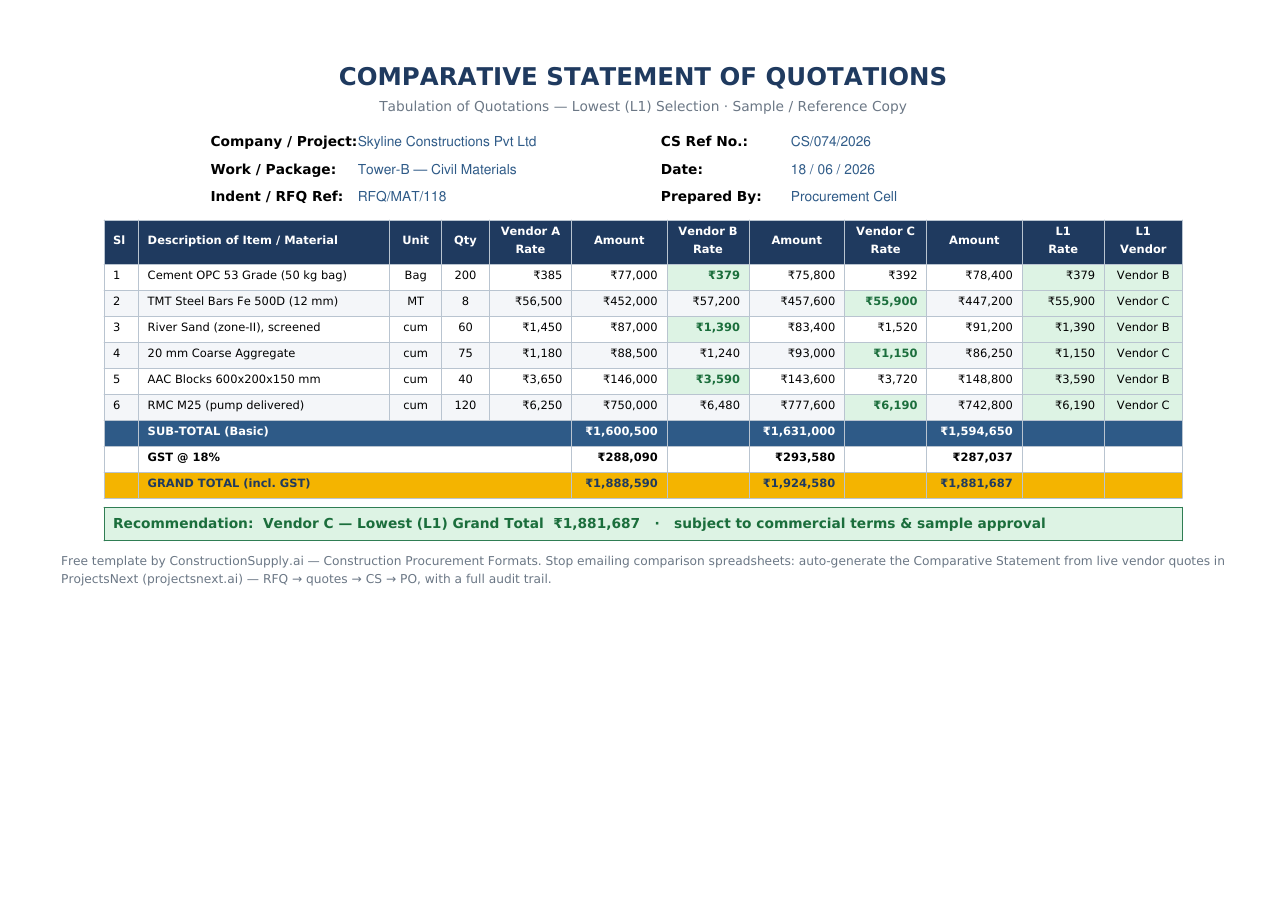
Excel (with formulas) & print-ready PDF. Free & editable.
⬇ Download Excel (.xlsx) ⬇ Download PDFWhat is a comparative statement of quotations?
A comparative statement (also called tabulation of quotations or a quotation comparison sheet) is the procurement document that places every supplier's quoted rates against the same scope of items, so the purchase committee can compare them on a like-for-like basis and justify awarding the order to the lowest evaluated bidder (L1). In Indian public procurement it is mandated under GFR 2017 and most CPWD / PWD / PSU purchase manuals; in private construction it is the standard control before a Purchase Order is released.
Comparative statement format — sample
Here is the structure the template produces. The lowest rate on each line is highlighted, and each vendor's basic total, GST and grand total are calculated automatically:
| Sl | Description of Item / Material | Unit | Qty | Vendor A Rate | Vendor B Rate | Vendor C Rate | L1 (Lowest) |
|---|---|---|---|---|---|---|---|
| 1 | Cement OPC 53 Grade (50 kg bag) | Bag | 200 | ₹385 | ₹379 | ₹392 | Vendor B |
| 2 | TMT Steel Bars Fe 500D (12 mm) | MT | 8 | ₹56,500 | ₹57,200 | ₹55,900 | Vendor C |
| 3 | River Sand (zone-II), screened | cum | 60 | ₹1,450 | ₹1,390 | ₹1,520 | Vendor B |
| 4 | 20 mm Coarse Aggregate | cum | 75 | ₹1,180 | ₹1,240 | ₹1,150 | Vendor C |
| SUB-TOTAL (Basic) | ₹16,00,500 | ₹16,31,000 | ₹15,94,650 | ||||
| GRAND TOTAL (incl. 18% GST) | ₹18,88,590 | ₹19,24,580 | ₹18,81,687 | Vendor C ✓ | |||
Recommendation in the sample: Vendor C — lowest evaluated grand total (L1), subject to commercial terms and sample approval.
What to include in a comparative statement
- Item description, unit & quantity — identical scope for every vendor (apples-to-apples).
- Rate & amount per vendor — amount = quantity × rate (auto-calculated in the Excel).
- Lowest rate (L1) per line + the recommended vendor by grand total.
- Taxes (GST), freight & discounts — so you compare landed cost, not just basic rate.
- Commercial terms — delivery period, payment terms, quotation validity, GST/MSME status.
- Approvals — prepared by / checked by / approved by, with the award justification.
How to prepare a comparative statement (step by step)
- List the scope once — enter every item, unit and quantity in the left columns.
- Enter each vendor's quoted rates in their column; the sheet computes the amount automatically.
- Normalise the basis — make sure GST, freight and discounts are treated the same way for all vendors.
- Let the sheet flag L1 — the lowest rate per line is highlighted and each vendor is totalled.
- Compare landed grand totals (incl. GST), not just basic rates.
- Record the recommendation & approvals — award to the lowest evaluated bidder and note any deviation.
A spreadsheet breaks the moment scope changes, vendors revise rates, or someone emails the wrong version. ProjectsNext runs the whole cycle — RFQ → vendor quotes → automatic Comparative Statement → Purchase Order — with live rates, version control and a full audit trail. The CS builds itself.
See procurement in ProjectsNext →Frequently asked questions
It is a side-by-side tabulation of supplier quotations against the same items, used to evaluate rates on a like-for-like basis and justify awarding the order to the lowest evaluated (L1) bidder.
Download the Excel template above, list your items/quantities once, paste each vendor's rates, and the sheet auto-calculates amounts, highlights the lowest rate per line, and totals each vendor including GST.
L1 is the lowest evaluated bidder — the vendor with the lowest landed cost after taxes and terms are normalised. The template flags L1 per line and by grand total.
Yes — both the Excel and PDF are free to download and edit, with no sign-up.
More construction procurement formats: all templates · Purchase Order · RFQ · Work Order · BOQ · RA bill (coming soon).